Can You Use a Visa Gift Card on Amazon?
Updated August 1, 2026 · Reviewed by Kirill Novikov, FlipGift founder
Yes — but with one important catch. Amazon accepts prepaid Visa gift cards (and Mastercard and Amex gift cards) as a payment method, the same way it accepts a debit card. The catch: Amazon won't split a single order across two payment cards, so the gift card has to cover the entire charge — item, tax and shipping — in one go. That is the part that trips almost everyone up, and there is a clean workaround for whatever is left over.
How to add a Visa gift card to your Amazon account
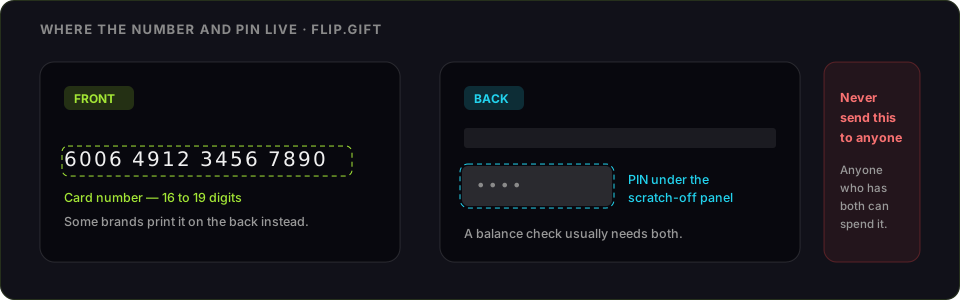
- Check the balance at the issuer site printed on the back of the card, so you know the exact figure you are working with. Our Visa balance guide covers where each issuer's lookup lives.
- Register a billing address on the card at that same issuer site. A brand-new prepaid card usually has no address attached to it, and online checkouts verify one. The activation walkthrough has the details per issuer.
- In Amazon, open Your Account → Payments → Add a payment method and enter the card exactly as you would a credit card: long number, expiry date, security code.
- Give the billing address you just registered — it has to match what the issuer holds, not your Amazon delivery address.
- At checkout, select that card as the payment method and place the order.
Amazon stores the card in your wallet like any other, but it does not move the money into your account. Each order charges the card at the moment you check out, which is why the balance has to be right on the day rather than on the day you added it.
Why the billing address matters — Vanilla and every other prepaid brand
The single most common reason a perfectly good prepaid card fails at Amazon has nothing to do with Amazon. Online card payments run an address check: the ZIP code you type at checkout is compared against the one the card issuer holds. A gift card bought off a rack has no name and no address on file until you put one there, so the check has nothing to compare and the payment is refused.
Every prepaid brand handles this the same way — Vanilla, Visa-branded bank cards, Mastercard gift cards, the ones sold at supermarket checkouts. Go to the website printed on the back of the card, register your own name and ZIP, then use that same ZIP on Amazon. It takes a couple of minutes and it is the difference between a card that works everywhere and one that only works in a physical shop.
Using a Visa gift card as partial payment on Amazon
This is the part people search for most, because the obvious approach does not work: Amazon will not take $40 from the gift card and the remaining $12 from your own card. One order, one payment card.
What does work is moving the gift card's value into your Amazon Balance first, because Amazon will combine your balance with one payment card on the same order:
- Go to Gift Cards → Reload Your Balance.
- Enter the exact amount left on the Visa gift card.
- Pay for that reload with the Visa gift card itself.
The value lands in your Amazon Balance and is applied automatically to your next order, with any shortfall going to your regular card. Reloads have an on-screen minimum, so a balance of a few cents may not qualify — check the figure Amazon shows before you start.
Buying yourself an Amazon eGift card for the leftover amount and emailing it to your own address does the same job; redeeming it credits your balance. If Amazon blocks that on your account, the reload route is the one to use.
Why a Visa gift card gets declined on Amazon
Almost every decline comes down to one of these:
- The balance did not cover the whole total. Tax and shipping count. Being a few cents short fails the same way being $50 short does.
- The billing ZIP did not match, usually because no address was ever registered on the card.
- A pre-authorisation needed headroom. Some orders place a temporary hold slightly above the purchase amount; a card with the exact total and not a cent more can trip it.
- The card was never activated. Most are activated at the till when bought, but not all — the issuer site will say.
- The card has expired. Prepaid cards carry an expiry date on the plastic even when the funds themselves do not expire; an expired card usually needs a replacement from the issuer.
Amazon does not vary payment rules by seller, so an order from a third-party seller on the marketplace is no different — the checkout is still Amazon's.
Recurring charges: keep a real card on file
A prepaid card works well for one-off orders and badly for anything that renews. Prime, Subscribe & Save and any subscription bills again later, and by then the card is usually empty — the charge fails and the plan lapses. Some recurring plans reject prepaid cards outright. If the subscription matters, pay for it with a normal card and spend the gift card on ordinary orders.
If the balance still won't clear at Amazon
If the card will not go through and you would rather turn it into something else, the routes are the same as anywhere. FlipGift cannot buy a prepaid Visa — the marketplace works by having a seller place a real order at a specific store with their own card, and a Visa is not tied to a store (the full reasoning). Resale marketplaces do buy prepaid Visa cards, at roughly 60–85% of face value, and they want the card number and PIN before they pay; the comparison is here. Spending it down at a retailer that allows split payment keeps more of the value than any cash route — and where else a Visa gift card works covers the stores that do.
Frequently asked questions
Can you use a Visa gift card on Amazon?
Does Amazon accept prepaid Visa gift cards?
How do I add a Visa gift card to my Amazon account?
Why was my Visa gift card declined on Amazon?
How do I use up a small leftover Visa gift card balance on Amazon?
Can I split an Amazon order between a Visa gift card and another card?
Can I use a Visa gift card for Amazon Prime or a subscription?
What if I’d rather just have an Amazon gift card?
More gift cards you can sell this way
From the blog
How to Verify Gift Card Balance Before Trading a Card
Before you list, swap, or sell a gift card, confirm what's actually on it. Here's why balance checks matter and the three fastest ways to do one.
Can You Return Gift Cards? The Real Rules in 2026
Most stores treat gift cards as final-sale. But there are real exceptions — and if yours doesn’t qualify, you still have a way to get full value out.
What to Do With Unwanted Gift Cards: 6 Smart Options
Stuck with a card you'll never use? Here are six realistic options for unwanted gift cards, ranked by how much value you actually keep.