Can You Use a Visa Gift Card on DoorDash?
Updated September 1, 2026 · Reviewed by Kirill Novikov, FlipGift founder
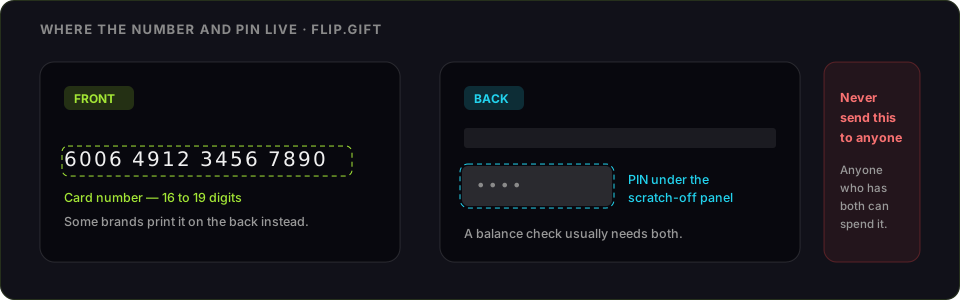
Yes — and one detail decides whether it works. DoorDash accepts prepaid Visa gift cards as a payment method. What catches people out is that the amount charged to the card is not the amount shown on the menu: DoorDash places a temporary authorisation hold that includes the tip and a margin, and a card holding exactly the order total gets declined for being a few dollars short.
How to add a Visa gift card to DoorDash
- Register the card first. Go to the issuer site printed on the back and put your name, address and ZIP on it. Online payments are checked against the address the issuer holds, and a rack-bought card has none until you add one.
- Check the balance while you are there, so you know the exact figure. Our Visa balance guide covers where each issuer's lookup lives.
- In the DoorDash app, open Account → Payment → Add Payment Method and enter the card number, expiry date and security code.
- Enter the billing ZIP you just registered — not your delivery address.
- Order for comfortably less than the balance, so the authorisation hold has room.
Why your Visa gift card gets declined on DoorDash
This is the most common complaint about prepaid cards and delivery apps, and it is nearly always one of these:
- The hold is bigger than the order. Delivery apps authorise more than the food costs, because the final total is not known until the driver is tipped and the order is closed. A $25 card and a $24.80 order will fail. Leave a few dollars of headroom, or order for well under the balance.
- The tip pushed it over. A tip added at checkout is part of the authorised amount. If money is tight on the card, tipping the driver in cash keeps the card charge down.
- The billing ZIP does not match. Unregistered cards fail this check every time, and the app usually reports it as a generic decline rather than an address error.
- You are trying to split the payment. DoorDash charges one payment method per order. It will not take $20 from the gift card and the rest from another card, so the card has to cover everything — food, fees, taxes and tip.
- The balance is small change. Once a card is down to a few dollars it is effectively unusable on an app that holds more than it charges.
If the card keeps failing after registering an address and leaving headroom, it is not a DoorDash problem — the same card will behave the same way on any delivery app.
Vanilla, and other prepaid brands
Vanilla is the card most people are holding when they ask this, and the issuer's own guidance says it can be used to buy on DoorDash. Every other prepaid brand works the same way, because the friction is not brand-specific: it is the authorisation hold and the address check, which apply to any card that is not linked to a bank account with a real cardholder behind it.
The one step that changes outcomes is registration. A card with your name and ZIP on file at the issuer behaves like an ordinary debit card online; one straight off the rack does not. How to activate and register a Visa gift card walks through it per issuer.
DashPass and other recurring charges
A prepaid card is a poor fit for a subscription. DashPass bills again every month, and by the next renewal the card is usually empty, so the plan lapses and you find out when a delivery fee appears. Use a normal card for anything that renews and spend the gift card on individual orders.
Cheaper than a gift card: paying less for the order itself
Worth knowing if the reason you are here is to save money rather than to spend an awkward balance. FlipGift is a marketplace where someone holding store credit places your order and ships it to you, and you pay 8–40% less than the receipt with the money held in escrow until the parcel arrives. It works for retailers that ship goods — not for restaurant delivery, where there is nothing to ship and the order is prepared for an address in minutes. So DoorDash is not something we can discount, and this page is not going to pretend otherwise.
If the balance will not clear at all
FlipGift cannot buy a prepaid Visa either: the marketplace works by having a seller place a real order at a specific store with their own card, and a Visa is not tied to a store (the full reasoning). Resale marketplaces do buy prepaid Visa cards, at roughly 60–85% of face value, and they want the card number and PIN before they pay; the comparison is here. Spending it down where split payment is allowed keeps more of the value than any cash route — where else a Visa gift card works covers the stores with quirks, and on Amazon is its own case.
Frequently asked questions
Can you use a Visa gift card on DoorDash?
Does DoorDash accept prepaid Visa gift cards?
How do I add a Visa gift card to DoorDash?
Why won’t my Visa gift card work on DoorDash?
Can I split a DoorDash order between a Visa gift card and another card?
Can you use a Vanilla Visa gift card on DoorDash?
Can I pay for DashPass with a Visa gift card?
What can I do with a Visa gift card I cannot use on DoorDash?
More gift cards you can sell this way
From the blog
How to Verify Gift Card Balance Before Trading a Card
Before you list, swap, or sell a gift card, confirm what's actually on it. Here's why balance checks matter and the three fastest ways to do one.
Can You Return Gift Cards? The Real Rules in 2026
Most stores treat gift cards as final-sale. But there are real exceptions — and if yours doesn’t qualify, you still have a way to get full value out.
What to Do With Unwanted Gift Cards: 6 Smart Options
Stuck with a card you'll never use? Here are six realistic options for unwanted gift cards, ranked by how much value you actually keep.