Can You Add a Visa Gift Card to PayPal?
Updated September 2, 2026 · Reviewed by Kirill Novikov, FlipGift founder
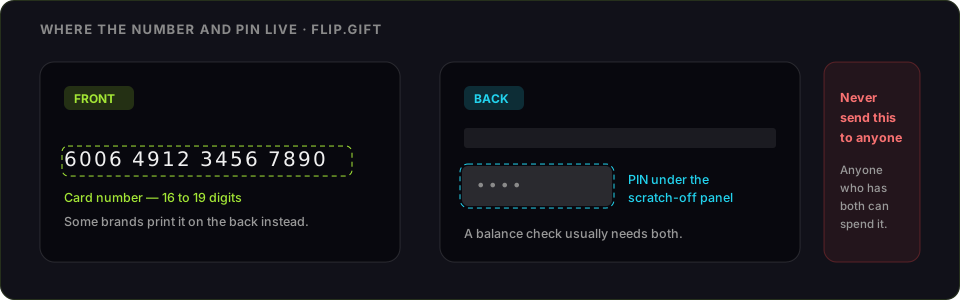
Yes to spending it, no to cashing it out. A Visa gift card can be linked to PayPal as a payment card and used at checkout wherever PayPal is accepted. What it cannot do is become PayPal balance: linking a card gives PayPal something to charge, not money to hold, so there is no route from a gift card to your balance and out to a bank account.
That distinction is the whole page. Most people arriving here want the second thing.
How to add a Visa gift card to PayPal
- Register the card first at the issuer site printed on the back — your name, address and ZIP. PayPal checks the billing address against the issuer's records, and a rack-bought card has nothing on file until you put it there.
- Check the balance while you are there, so you know the exact figure. Our Visa balance guide lists where each issuer's lookup lives.
- In PayPal, open Wallet → Link a card and enter the card number, expiry date and security code.
- Enter the billing ZIP you registered, not your delivery address.
- Choose the card as the funding source at checkout.
The link step may place a small temporary authorisation to verify the card. On a nearly-empty card that alone can fail, so link the card while it still has a few dollars of headroom.
Can you transfer a Visa gift card to your PayPal balance?
Not as a normal, reliable route. PayPal's own guidance is deliberately non-committal: it says it may be possible to add gift cards to a digital wallet, that this "will come down to the type of gift card and the digital wallet", and that funds may be withdrawable to a linked bank account "depending on the gift card issuer, the terms of the gift card, and the accounts being used". That is not a feature — it is a description of why people's attempts have mixed results.
What is consistent is the underlying design. A linked card is a funding source: PayPal charges it when you pay someone. Your PayPal balance is money PayPal holds for you, topped up from a bank account or from payments you receive. Nothing pushes value from the first into the second, which is why sending yourself money from the card does not work either — that is a payment, complete with the fees and the risk of the account being flagged for it.
If your goal was cash rather than spending, a gift card is simply the wrong instrument, and the honest options are set out at the end of this page.
Why PayPal declines a Visa gift card
- No billing address registered. The most common cause by a distance, and the one that looks like a mysterious generic decline rather than an address error.
- The verification hold did not fit. Linking a card and some checkouts authorise slightly more than the amount charged. A card with the exact total and nothing spare can fail on that alone.
- The card is virtual or online-only. Some digital gift cards are issued for single-merchant use and cannot be linked anywhere.
- The balance no longer covers the payment. PayPal charges one funding source per transaction; a shortfall is a decline, not a partial charge.
Combining two Visa gift cards in one PayPal payment
You cannot. PayPal charges one card per transaction, so two prepaid cards cannot be pooled to cover a single payment. If PayPal is holding a balance for you, that balance can cover part of a payment with a card covering the rest — but that is balance plus one card, never card plus card.
The practical workaround for two awkward cards is the same one that works everywhere: spend each one down separately, on purchases small enough that a single card covers the whole charge.
What linking a gift card to PayPal is actually good for
It is genuinely useful in two situations, and both are worth knowing:
- Merchants that take PayPal but choke on prepaid cards. Routing the payment through PayPal sometimes clears where entering the card directly does not, because the merchant sees PayPal rather than a prepaid BIN.
- Sites that only offer PayPal. A gift card becomes usable at checkouts that never accepted cards in the first place.
Neither of these converts the card to cash. They just widen where it can be spent, which for an awkward balance is often the point. Where else a Visa gift card works covers the stores with quirks, on Amazon is its own case, and activation and registration is the step that unblocks most online refusals.
If what you wanted was cash
FlipGift cannot buy a prepaid Visa. The marketplace works by having a seller place a real order at a specific store using their own card, and a Visa is not tied to a store — there is nothing to order against it (the full reasoning). Resale marketplaces do buy prepaid Visa cards, at roughly 60–85% of face value, and they want the card number and PIN before they pay; the comparison is here.
If you also hold a store card
FlipGift covers 198 stores that ship physical orders — Home Depot, Target, Sephora, Best Buy, Lowe's and the rest. For those, you can sell the value through escrow without ever sharing the number or PIN: you keep the card, place a verified buyer's order with it, and the escrowed payment releases once they confirm the parcel arrived. It is a different mechanism from a prepaid Visa precisely because there is a store behind the card.
Frequently asked questions
Can you add a Visa gift card to PayPal?
How do I add a Visa gift card to PayPal?
Can you transfer a Visa gift card to your PayPal balance?
Why won’t PayPal accept my Visa gift card?
Can I combine two Visa gift cards on PayPal?
Does PayPal accept prepaid Visa gift cards?
Can I cash out a Visa gift card through PayPal?
What can I do with a Visa gift card I cannot use on PayPal?
More gift cards you can sell this way
From the blog
How to Verify Gift Card Balance Before Trading a Card
Before you list, swap, or sell a gift card, confirm what's actually on it. Here's why balance checks matter and the three fastest ways to do one.
Can You Return Gift Cards? The Real Rules in 2026
Most stores treat gift cards as final-sale. But there are real exceptions — and if yours doesn’t qualify, you still have a way to get full value out.
What to Do With Unwanted Gift Cards: 6 Smart Options
Stuck with a card you'll never use? Here are six realistic options for unwanted gift cards, ranked by how much value you actually keep.