How to Redeem a Roblox Gift Card
Updated August 2, 2026 · Reviewed by Kirill Novikov, FlipGift founder
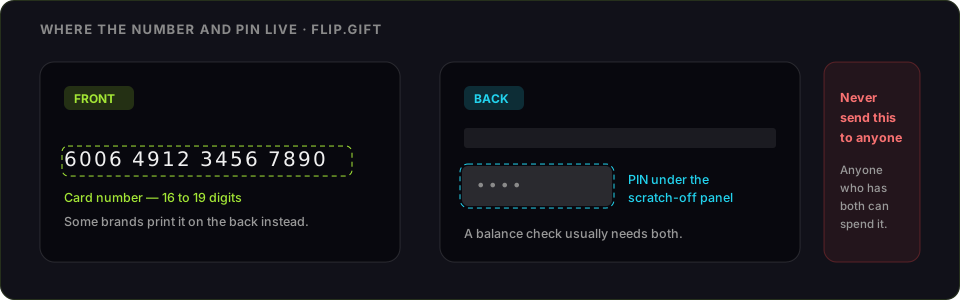
A Roblox gift card becomes Roblox Credit on your account, and you then spend that credit on Robux or a Premium membership. It is two steps, not one, which is where most of the confusion starts. Below: the exact steps, the free virtual item people miss, every reason a PIN gets rejected, and what the credit is worth if you do not play.
How to redeem a Roblox gift card
- Open roblox.com/redeem in a web browser — on a phone, tablet or computer.
- Log in to the Roblox account the credit should land on. Get this right: credit cannot be moved between accounts afterwards.
- Reveal the PIN — scratch the grey strip on the back of a physical card, or copy it from the email for a digital one.
- Enter the code exactly, with no spaces, and select Redeem.
- A confirmation appears and the value is added as Roblox Credit.
- Spend the credit: go to Robux → Buy Robux, or Premium, and the credit is offered as the payment method.
Redemption is a website job. On most devices the Roblox app has no redeem screen, and trying to find one there is the single most common reason people think their card is broken.
Do not miss the free virtual item
Roblox gift cards ship with a bonus virtual item code — a separate code, usually printed on the same card or included in the gift email. It is redeemed on the same roblox.com/redeem page and is unrelated to the credit value. The items are time-limited by promotion, so claim it when you redeem the card rather than later.
What you will need
- The PIN from the back of the card or the gift email
- A Roblox account you are logged into
- A web browser — not the Roblox app
Roblox gift card not working: what each error means
- "Invalid PIN" or "This code is not valid." Almost always a character still hidden under the scratch panel, or a look-alike misread — 0 against O, 1 against I or l. Clear the strip completely and type the code by hand rather than pasting.
- Nothing happens, or there is no redeem option. You are in the app. Open roblox.com/redeem in a browser instead.
- "This code has already been redeemed." Codes are single-use and the credit belongs to whichever account claimed it first. If it was not you, the card was compromised before you got it — keep the receipt and the card and contact Roblox support.
- Region mismatch. A card is sold for one country and its currency. A card bought abroad may simply refuse, and there is no conversion.
- Too many failed attempts. Repeated wrong entries lock redemption for a while. Stop, check every character, and come back later.
- The credit is there but you cannot buy Robux. Credit and Robux are not the same thing. Go to Buy Robux and pick the credit as the payment method — the balance does not convert on its own.
What Roblox Credit can and cannot do
Credit buys Robux and Premium on the account that redeemed it. It cannot be transferred to another account, cannot be refunded to cash, and does not spend anywhere outside Roblox. Robux itself only leaves the platform through the Developer Exchange, which needs Premium and a payout threshold — not a route for someone who simply does not play.
If you are never going to use it
Roblox Credit locks to the account that redeemed it the moment you enter the PIN. So the decision has to come first: an unredeemed code still has options, a redeemed one has none.
FlipGift cannot buy this one, and it is worth saying why rather than burying it. Our escrow marketplace works by having a seller place a real, shipped order with their own gift card — the buyer gets a parcel, the money releases on delivery, and the code never changes hands. A code that only buys digital content has no parcel behind it, so there is nothing for a seller to do here. Store cards that ship things (Amazon, Home Depot, Nike and ~190 others) work here; this one does not.
That leaves the resale marketplaces, and the trade they ask for is the whole risk: they can only pay you by taking the code, and whoever holds the code can spend it. What each route actually pays for a Roblox card runs the numbers before you pick one. Two rules either way — check the balance immediately before you sell, and never send a code to a private buyer who promises to pay afterwards.
Official source: Roblox's gift card redemption page.
Official source: Roblox gift card page
Frequently asked questions
Where do I redeem a Roblox gift card?
Can I redeem a Roblox gift card in the app?
How do I turn Roblox Credit into Robux?
Why will my Roblox gift card PIN not work?
What is the extra code on a Roblox gift card?
Can I sell a Roblox gift card instead of redeeming it?
Guides for other gift cards
From the blog
How to Verify Gift Card Balance Before Trading a Card
Before you list, swap, or sell a gift card, confirm what's actually on it. Here's why balance checks matter and the three fastest ways to do one.
Can You Return Gift Cards? The Real Rules in 2026
Most stores treat gift cards as final-sale. But there are real exceptions — and if yours doesn’t qualify, you still have a way to get full value out.
What to Do With Unwanted Gift Cards: 6 Smart Options
Stuck with a card you'll never use? Here are six realistic options for unwanted gift cards, ranked by how much value you actually keep.