How to Redeem an Amazon Gift Card
Updated August 2, 2026 · Reviewed by Kirill Novikov, FlipGift founder
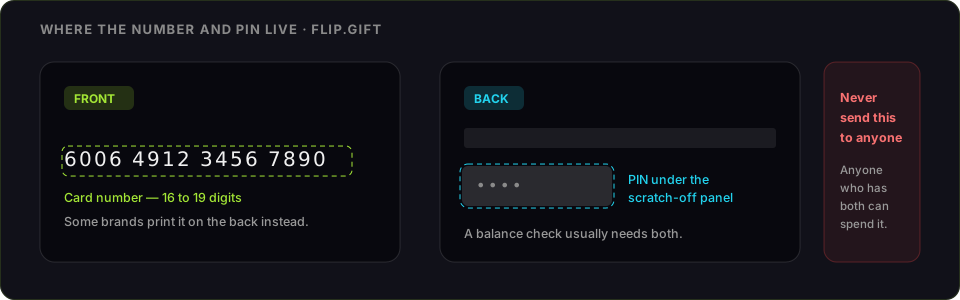
An Amazon gift card adds to your Amazon Gift Card Balance, which applies automatically at checkout on eligible orders. Redeeming takes about a minute. Below: the exact steps, every claim-code error and what causes it, what the balance cannot pay for — and the one decision to make before you redeem, if it is a card you were never going to use.
How to redeem an Amazon gift card
- Go to amazon.com/redeem, or Account → Gift Cards → Redeem a Gift Card.
- Sign in to the account the balance should land on. Get this right — the balance cannot be moved afterwards.
- Enter the claim code from the back of the card, the email, or the packing slip on a physical card.
- Select Apply to your balance. The amount lands instantly.
- It applies automatically to your next eligible order — there is nothing to enter at checkout.
What you will need
- The claim code — on the back of a physical card under the scratch-off, or in the body of a gift email
- An Amazon account on the right marketplace
- A browser or the Amazon app
Amazon gift card code not working: every error and its fix
- "This is not a valid claim code." Nearly always a mistyped character. Claim codes are not case-sensitive, but a scratched or partly covered character reads as a different one — the usual pairs are 0/O, 1/I/l and 5/S. Scratch the panel fully and re-enter by hand rather than pasting.
- "This gift card has already been applied to an account." Codes are single-use, and the balance sits with whichever account claimed it first. If that was you, check Your Account → Gift Card Balance. If it was not, the card was compromised before you got it — take the receipt back to the retailer, and contact Amazon customer service with the code and proof of purchase.
- "This claim code cannot be redeemed in this marketplace." Amazon runs each country as a separate marketplace with a separate balance. An amazon.com card redeems only on amazon.com — not on amazon.ca, amazon.co.uk or amazon.de. There is no conversion between them.
- "We cannot apply this gift card to your account." Amazon holds codes that trip its fraud checks, typically when a card is bought with a disputed payment method or redeemed from an unusual location. Only customer service can release it, and they will want the receipt.
- The code has run out of attempts. Repeated wrong entries lock the code for a period. Stop, verify each character against the card, and try again later.
Where the balance goes — and what it will not buy
Gift Card Balance is tied to the account and to that marketplace. Once applied it is non-transferable and non-refundable, and Amazon does not convert it back to cash except where a state law requires it. It also cannot be used to buy other gift cards, which closes the obvious escape route.
It does cover ordinary orders sold by Amazon and by third-party sellers, digital content, and subscriptions billed to the account. It is applied before your card is charged, and any remainder stays on the balance.
Turning an Amazon gift card into cash
The order matters here, so read this before you redeem: once the code is on an account, the value is locked to that account. A redeemed card cannot be sold, gifted, or moved. If there is any chance you do not want it, do not redeem it.
If you would rather have the money, FlipGift buys Amazon cards without ever seeing the code. A buyer who wants something from Amazon pays into escrow, you place their order with your own card and balance, the item ships to them, and the money releases when it arrives. You keep the card, the code stays yours, and there is no resale marketplace taking a cut of a code it now owns.
Sell an Amazon gift card for cash — the code never changes hands, or read how escrow selling works first. Not sure what is on the card? Check the Amazon balance before you decide.
Official source: Amazon's gift card redemption help.
Amazon at a glance
| Sellers ready now | 7 offering up to $1,549 |
|---|---|
| Discount band offered | 10–40% off retail |
| Deals in the last 30 days | 24 |
| Category | Universal retail |
| Free shipping at | $35+ on Amazon.com |
| Flat shipping below that | $7 |
| In the catalogue | Yes — requests accepted |
Live from the FlipGift order book.
Official source: Amazon gift card page
Frequently asked questions
Where do I redeem an Amazon gift card?
Why does Amazon say my claim code is not valid?
What does "this gift card has already been applied to an account" mean?
Can I use an Amazon gift card on amazon.co.uk or amazon.ca?
Can an Amazon gift card balance be turned back into cash?
What should I do with an Amazon card I do not want?
Guides for other gift cards
From the blog
How to Verify Gift Card Balance Before Trading a Card
Before you list, swap, or sell a gift card, confirm what's actually on it. Here's why balance checks matter and the three fastest ways to do one.
Can You Return Gift Cards? The Real Rules in 2026
Most stores treat gift cards as final-sale. But there are real exceptions — and if yours doesn’t qualify, you still have a way to get full value out.
What to Do With Unwanted Gift Cards: 6 Smart Options
Stuck with a card you'll never use? Here are six realistic options for unwanted gift cards, ranked by how much value you actually keep.