How to Redeem a Spotify Gift Card
Updated August 2, 2026 · Reviewed by Kirill Novikov, FlipGift founder
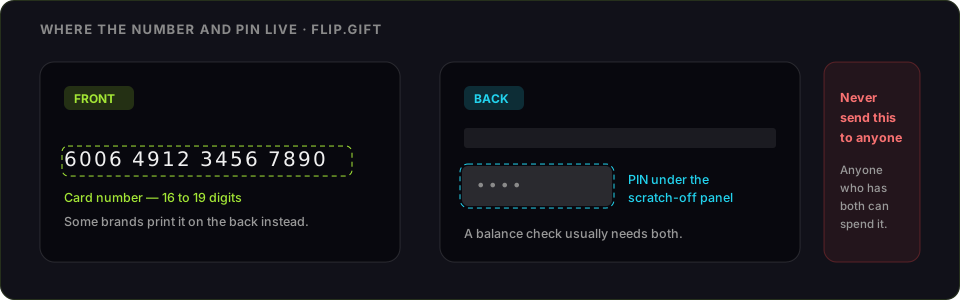
A Spotify gift card does not create a spendable balance. It adds Premium time to one account — a number of months of Individual Premium, applied to your billing. That difference is behind almost every problem people hit with these cards, and it is worth understanding before you enter the PIN.
How to redeem a Spotify gift card
- Go to spotify.com/redeem in a web browser. The Spotify app has no redemption screen.
- Log in to the account that should get Premium.
- Reveal the PIN — scratch the panel on the back of the card, or copy it from the gift email.
- Enter the PIN and select Redeem.
- The Premium time is applied. If you already pay Spotify directly, the code is used first and your billing date moves out.
What you will need
- The PIN from under the scratch-off
- A Spotify account — ideally not currently billed by a third party
- A web browser
Fix third-party billing first
This is the step the card packaging does not mention. If you subscribed through Apple, Google Play, a mobile carrier or a cable provider, Spotify does not control your billing, and gift card time cannot be applied on top of it. Cancel that subscription through whoever bills you, wait for it to lapse or switch to paying Spotify directly, and only then redeem the code. Redeeming while a third-party plan is live is the most common way a card appears to vanish.
Spotify code not working: what each error means
- "This code is invalid." A character still hidden under the panel, or an 0/O or 1/I misread. Re-enter by hand.
- "This code has already been used." Single-use per account, and the time went to whoever redeemed it first.
- Nothing changes after redeeming. Third-party billing, almost always — see above.
- You are on Duo, Family or Student. Gift cards apply to Individual Premium. On a shared or discounted plan the code may not attach until the plan changes.
- Region mismatch. A card is sold for one country's Spotify, and the account country has to match.
What Spotify Premium time can and cannot do
It runs your own Individual Premium and nothing else. It cannot be moved to another account, cannot be cashed out, cannot pay for a Family plan's other members, and cannot be paused once it starts running — the months tick down whether you listen or not.
If you are never going to use it
Premium time starts against one account and cannot be reassigned. An unredeemed card is still worth something to someone else; a redeemed one is months of music you did not want.
FlipGift cannot buy this one, and it is worth saying why rather than burying it. Our escrow marketplace works by having a seller place a real, shipped order with their own gift card — the buyer gets a parcel, the money releases on delivery, and the code never changes hands. A code that only buys digital content has no parcel behind it, so there is nothing for a seller to do here. Store cards that ship things (Amazon, Home Depot, Nike and ~190 others) work here; this one does not.
That leaves the resale marketplaces, and the trade they ask for is the whole risk: they can only pay you by taking the code, and whoever holds the code can spend it. Compare CardCash and its alternatives — what they pay and how each one handles the code — before you pick one. Two rules either way — check the balance immediately before you sell, and never send a code to a private buyer who promises to pay afterwards.
Official source: Spotify's gift card redemption page.
Official source: Spotify gift card page
Frequently asked questions
Where do I redeem a Spotify gift card?
Why did nothing happen after I redeemed my Spotify code?
Does a Spotify gift card give me a balance?
Can a Spotify gift card pay for a Family or Duo plan?
Can Premium time be moved to another account?
Can I sell a Spotify gift card instead of redeeming it?
Guides for other gift cards
From the blog
How to Verify Gift Card Balance Before Trading a Card
Before you list, swap, or sell a gift card, confirm what's actually on it. Here's why balance checks matter and the three fastest ways to do one.
Can You Return Gift Cards? The Real Rules in 2026
Most stores treat gift cards as final-sale. But there are real exceptions — and if yours doesn’t qualify, you still have a way to get full value out.
What to Do With Unwanted Gift Cards: 6 Smart Options
Stuck with a card you'll never use? Here are six realistic options for unwanted gift cards, ranked by how much value you actually keep.