How to Redeem a Starbucks Gift Card
Updated September 23, 2026 · Reviewed by Kirill Novikov, FlipGift founder
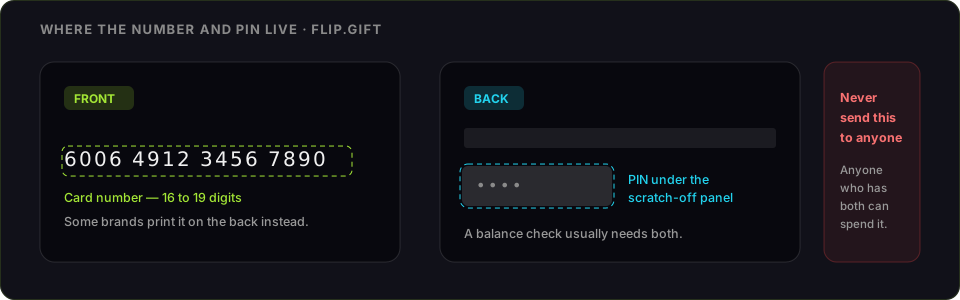
A Starbucks gift card is usable straight away at the register — you do not have to redeem anything. Adding it to the Starbucks app is what turns it into a digital Starbucks Card that earns Stars, works for mobile order, and cannot be lost with your wallet. Below: how to add it, how to spend it either way, and what to do when the app refuses the card.
How to redeem a Starbucks gift card
- Open the Starbucks app and sign in (or use starbucks.com).
- Go to Cards and choose Add card.
- Enter the 16-digit card number and the 8-digit security code from the back — the code is usually under a scratch panel.
- Confirm. The balance transfers onto a digital Starbucks Card in your account.
- Pay by scanning the app in store, or select the card at checkout in mobile order.
Once the balance has moved, the physical card is empty. Keep it until you have seen the balance land, then it is just plastic.
Using it without the app
Hand the card to the barista, or tap it at the register — no account, no scanning, no setup. The trade-off is that a card spent this way earns no Stars: rewards only accrue when you pay with a Starbucks Card registered to your account. If you go to Starbucks regularly, adding it to the app is worth the two minutes.
What you will need
- The card number and security code from the back
- A Starbucks account, free to create
- The app or a browser
When the app will not take the card
- "This card cannot be added." Recheck the security code first — it is under a scratch panel and easily misread, and it is a different number from the card number.
- The balance is already gone. If the card has been added to another account, the balance moved there. Once transferred, the physical card is empty by design.
- Wrong country. US and international Starbucks cards are separate systems and cannot be combined or transferred between them.
- A promotional or partner card. Some giveaway and partner cards can be spent in store but not registered to an account.
What a Starbucks balance can and cannot do
It spends at Starbucks — drinks, food, beans, merchandise — and it earns Stars when paid from a registered card. Starbucks does not charge fees on gift card balances and they do not expire, so there is no clock on deciding. You can merge balances between your own cards in the app, which is the tidy way to deal with a drawer full of small ones. It cannot be turned back into cash.
If you are never going to use it
Nothing is urgent here: a Starbucks balance carries no fees and no expiry, so you can take your time. What you cannot undo is transferring it onto an account you did not mean to.
You can sell it on FlipGift — as a Starbucks order. A buyer posts the Starbucks order they want, for delivery or pickup; you place it from your Starbucks app with your card balance, and the escrowed payment is released to you once they have it. The code never changes hands — see Starbucks on FlipGift.
The other route is a resale marketplace, and the trade it asks for is the whole risk: they can only pay you by taking the code, and whoever holds the code can spend it. What each route actually pays for a Starbucks card sets out the numbers first. Two rules either way — check the balance immediately before you sell, and never send a code to a private buyer who promises to pay afterwards.
Official source: the Starbucks Card page.
Starbucks at a glance
| Sellers ready now | 1 offering up to $20 |
|---|---|
| Discount band offered | 8–8% off retail |
| Category | Coffee treats |
| In the catalogue | Starbucks is not listed yet |
Live from the FlipGift order book.
Official source: Starbucks gift card page
Frequently asked questions
How do I add a Starbucks gift card to the app?
How do I use a Starbucks gift card?
Do I earn Stars when paying with a gift card?
Why will the app not accept my Starbucks card?
Do Starbucks gift cards expire or carry fees?
Can I sell a Starbucks gift card?
Guides for other gift cards
From the blog
How to Verify Gift Card Balance Before Trading a Card
Before you list, swap, or sell a gift card, confirm what's actually on it. Here's why balance checks matter and the three fastest ways to do one.
Can You Return Gift Cards? The Real Rules in 2026
Most stores treat gift cards as final-sale. But there are real exceptions — and if yours doesn’t qualify, you still have a way to get full value out.
What to Do With Unwanted Gift Cards: 6 Smart Options
Stuck with a card you'll never use? Here are six realistic options for unwanted gift cards, ranked by how much value you actually keep.