How to Redeem a Google Play Gift Card
Updated August 2, 2026 · Reviewed by Kirill Novikov, FlipGift founder
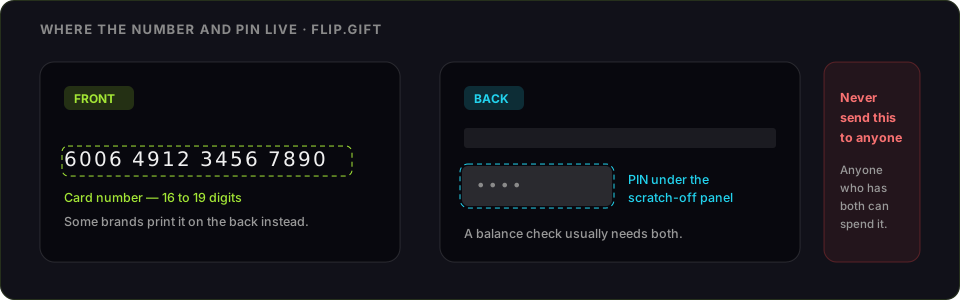
A Google Play gift card adds to your Google Play balance, spendable on apps, games, in-app purchases, films and books. Redeeming takes about a minute. Below: the steps, the region lock that stops more of these cards than anything else, and what the balance is actually worth if Google Play is not where you spend.
How to redeem a Google Play gift card
- Open the Google Play Store app, or go to play.google.com/redeem in a browser.
- Tap your profile icon, then Payments & subscriptions → Redeem gift code.
- Scratch the silver strip off completely and enter the code from the back of the card, or the code from your gift email.
- Tap Redeem, then confirm.
- The value lands in your Google Play balance and is spent automatically on your next Play purchase.
On each device
- Android: Play Store app → profile icon → Payments & subscriptions → Redeem gift code.
- iPhone or iPad: there is no Play Store app — use play.google.com/redeem in Safari, signed in to the right Google account.
- Desktop: play.google.com/redeem, or enter the code at checkout when buying something on Google Play.
What you will need
- The code under the scratch-off strip, or in the gift email
- A Google account signed in
- The Play Store app, or any browser
Google Play code not working: what each error means
- "This code isn't valid in your country." The one that catches most people. Google Play cards are region-locked to the country they were sold in, and your Play country is fixed by the account, not by where you are standing. Google allows a country change roughly once a year, and changing it does not carry the old balance across. A US card cannot be redeemed on a UK account, and there is no conversion.
- "This gift code has already been redeemed." Single-use, and the balance belongs to the account that claimed it first. Check Payments & subscriptions → Payment methods to see whether it was yours.
- "This gift code is invalid." Usually a character still under the scratch panel, or a misread 0/O or 1/I. Clear the strip fully and type the code by hand.
- "This code cannot be redeemed right now." Repeated failed attempts lock the code temporarily. Wait, verify each character, and try again.
- Card not activated. A card that did not clear the register's scan will not redeem. The receipt is what gets it activated by the retailer.
What Google Play balance can and cannot buy
It buys apps, games, in-app purchases, subscriptions billed through Play, films and books. It does not buy hardware from the Google Store, cannot be transferred to another Google account, cannot be split across countries, and cannot be refunded to cash. Balance is per-account and permanent — which is why the decision below has to come before you redeem.
If you are never going to spend it
Being straight about it: FlipGift cannot buy this one. Our escrow marketplace works by having a seller place a real, shipped order with their own gift card, and a Google Play code only buys Google Play content — there is no parcel for anyone to send. Amazon, Apple, Home Depot and 190-odd other store cards work here; this one does not.
What is left is a resale marketplace, and those need the code itself. That is the trade: they can only pay you by taking the thing that spends the money. Before you pick one, what each route actually pays for a Google Play card sets out the numbers, and the alternatives compared side by side covers who is safe to deal with. Two rules either way — check the balance immediately before you sell, and never send the code to a private buyer who promises to pay after.
If the card you are holding is for a store that ships things, selling it through escrow keeps the code in your hands and pays more.
Official source: Google's help page on redeeming a gift card.
Official source: Google Play gift card page
Frequently asked questions
Where do I redeem a Google Play gift card?
How do I redeem a Google Play gift card on an iPhone?
Why does it say my Google Play code is not valid in my country?
Why will my Google Play code not redeem?
Can Google Play balance be used on the Google Store or moved to another account?
Can I sell a Google Play gift card?
Guides for other gift cards
From the blog
How to Verify Gift Card Balance Before Trading a Card
Before you list, swap, or sell a gift card, confirm what's actually on it. Here's why balance checks matter and the three fastest ways to do one.
Can You Return Gift Cards? The Real Rules in 2026
Most stores treat gift cards as final-sale. But there are real exceptions — and if yours doesn’t qualify, you still have a way to get full value out.
What to Do With Unwanted Gift Cards: 6 Smart Options
Stuck with a card you'll never use? Here are six realistic options for unwanted gift cards, ranked by how much value you actually keep.