How to Redeem an Apple Gift Card
Updated August 2, 2026 · Reviewed by Kirill Novikov, FlipGift founder
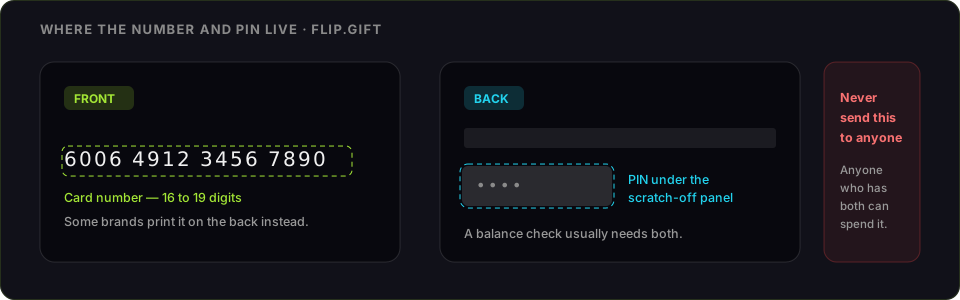
An Apple gift card adds to your Apple Account Balance. Since Apple merged its two cards in 2020, one Apple Gift Card covers both sides of the company: apps, subscriptions and media, and hardware and accessories at apple.com or in an Apple Store. Older cards still branded iTunes redeem exactly the same way. Below: the steps per device, the errors that actually stop people, and what the balance is worth if you have no use for it.
How to redeem an Apple gift card
- Open the App Store and tap your profile picture — or, on a Mac, open the App Store and choose your name at the bottom of the sidebar.
- Choose Redeem Gift Card or Code.
- Use Camera to scan the code, or tap You can also enter your code manually.
- Enter the 16-character code and confirm.
- The amount lands in your Apple Account Balance and is spent automatically on your next purchase.
Prefer a browser? Go to redeem.apple.com, sign in with the Apple Account that should hold the balance, and enter the code there. It is the same balance either way.
Where to find it on each device
- iPhone or iPad: App Store → profile picture (top right) → Redeem Gift Card or Code. Music, TV and Books apps all offer the same option.
- Mac: App Store → your name in the sidebar → Redeem Gift Card. In the Music app, Account → Redeem.
- Windows: the Apple Music or Apple TV app → Account → Redeem, or use redeem.apple.com in a browser.
- Apple Store app: Apple Gift Cards can also be applied to a hardware order at checkout rather than redeemed to the balance first.
What you will need
- The code — a 16-character string on the back of the card, or in the gift email
- An Apple Account signed in on the device
- An Apple device, a Windows PC with the Apple apps, or any browser
Apple gift card code not working: the real causes
- "This code has already been redeemed." Codes are one-time, and the balance sits with whichever Apple Account used it first. If it was not you, the card was compromised before you bought it — keep the receipt and the card, and take it to Apple Support.
- Region mismatch. A U.S. Apple gift card redeems only on a U.S. Apple Account, and the account's country is set by its payment method and billing address. This is the most common failure on cards bought as gifts from abroad, and there is no conversion — the card has to go to someone in that country.
- The scan fails. Wipe the panel and try again in even light; the middle characters of a foil code are the ones a camera misreads. Entering it by hand always works if the characters are legible.
- "This code is not valid." Scratch the panel fully — a covered character reads as a wrong one — and check you have not confused an iTunes gift card code with an Apple Store receipt number.
- Not activated at the register. A card that never cleared the cashier's scan will not redeem. The receipt proves it was paid for; the retailer can activate it.
What the Apple Account Balance can buy
Apps, in-app purchases, subscriptions billed to the Apple Account, iCloud+, Apple Music, Apple TV+, books and films — and, since the cards merged, orders at apple.com and in the Apple Store app. It is applied before your card on file is charged.
What it will not do: move to another Apple Account, split across countries, or convert back to cash. Once redeemed, the money stays inside Apple.
Getting cash for an Apple gift card instead
That last line is the whole decision, so make it before you redeem: a redeemed card cannot be sold. The value is locked to the account that claimed it.
Unredeemed, FlipGift buys Apple cards without the code ever leaving your hands. A buyer who wants something from Apple pays into escrow, you place their order with your own card, the item ships to them, and the money releases when it arrives. That is the difference from a resale marketplace, which needs the code itself — and once a code is handed over, whoever holds it can spend it.
Sell an Apple or iTunes gift card for cash — the code stays yours, or read how escrow selling works. Not sure of the balance? Check an Apple gift card balance first.
Official source: Apple's guide to redeeming a gift card.
Apple / iTunes at a glance
| Sellers ready now | 8 offering up to $940 |
|---|---|
| Discount band offered | 8–38% off retail |
| Deals in the last 30 days | 13 |
| Category | Electronics gaming |
| In the catalogue | Yes — requests accepted |
Live from the FlipGift order book.
Official source: Apple gift card page
Frequently asked questions
Where do I redeem an Apple gift card?
How do I redeem an Apple gift card on my iPhone?
Is an iTunes gift card the same as an Apple gift card?
Why will my Apple code not redeem?
Can an Apple gift card be used for a Mac or an iPhone?
What should I do with an Apple card I do not want?
Guides for other gift cards
From the blog
How to Verify Gift Card Balance Before Trading a Card
Before you list, swap, or sell a gift card, confirm what's actually on it. Here's why balance checks matter and the three fastest ways to do one.
Can You Return Gift Cards? The Real Rules in 2026
Most stores treat gift cards as final-sale. But there are real exceptions — and if yours doesn’t qualify, you still have a way to get full value out.
What to Do With Unwanted Gift Cards: 6 Smart Options
Stuck with a card you'll never use? Here are six realistic options for unwanted gift cards, ranked by how much value you actually keep.